WebPerf Snippets CLI
Run curated WebPerf Snippets headlessly via Playwright. Diagnose Core Web Vitals beyond what Lighthouse exposes and gate CI on real performance budgets.
Why
Lighthouse gives you a score. The DevTools snippets give you the diagnosis, TTFB / Resource Load Delay / Element Render Delay sub-parts, LoAF script attribution, render-blocking resources, and more. The CLI runs the same curated snippets in a headless browser so you can:
- Diagnose LCP regressions in CI without copy-pasting into DevTools.
- Gate pull requests on real performance budgets.
- Automate the snippets you already run by hand.
Install
Playwright is a peer dependency. Install both, then download the Chromium browser:
npm install --save-dev webperf-snippets playwright
npx playwright install chromium
Usage
npx webperf-snippets <url> [options]Examples
Run the default Core Web Vitals workflow (LCP + CLS, plus LCP-Subparts when LCP exceeds 2.5s):
npx webperf-snippets https://example.comJSON output (for piping into jq or CI scripts):
npx webperf-snippets https://example.com --jsonThe JSON output records how the page was measured in conditions, so a later run can tell whether it measured the same way: the viewport, the workflow (or the path of the snippet with --snippet), the wait and the version of the CLI.
"conditions": { "viewport": "mobile", "workflow": "core-web-vitals", "waitMs": 3000, "cliVersion": "1.5.0" }Run a single snippet by alias or by its own name, in any case. Every snippet of the collection runs this way, with or without its category:
npx webperf-snippets https://example.com --snippet LCP-Subparts
npx webperf-snippets https://example.com --snippet render-blocking
npx webperf-snippets https://example.com --snippet fonts
npx webperf-snippets https://example.com --snippet Compression-Audit
npx webperf-snippets https://example.com --snippet Interaction/DOM-Size-and-Depth
An unknown name exits with code 2 and lists the closest snippets.
Measure pages behind a login with a Playwright storage state (cookies and localStorage):
# Step 1: sign in once and save the session
npx playwright codegen --save-storage=auth.json https://example.com/login

# Step 2: measure an authenticated page
npx webperf-snippets https://example.com/dashboard --storage-state auth.json
The file holds live session cookies. Keep it out of version control (add it to .gitignore) and use a throwaway account when you run it in CI. The CLI exits with code 2 if the path does not exist.
Pages behind an access proxy that reads a token from every request, such as the service tokens of Cloudflare Access, take the token as request headers with --header, once per header:
npx webperf-snippets https://review.example.com \
  --header "CF-Access-Client-Id: $CF_ACCESS_CLIENT_ID" \
  --header "CF-Access-Client-Secret: $CF_ACCESS_CLIENT_SECRET"
The headers go with every request to the origin of the URL and never to another origin, so third parties do not receive the token and their cross-origin requests need no CORS preflight. Each request to that origin is paused in the browser to add them, which adds a few milliseconds to its timing; when the proxy accepts a session cookie, --storage-state measures without that cost. A header without a name or a colon exits with code 2. Read the values from environment variables, as above, to keep them out of the shell history.
Script the interactions of a page and measure them with --interact-script. The file lists the steps to run after the page loads:
{
  "interactions": [
    { "action": "scroll", "y": 600 },
    { "action": "wait", "ms": 300 },
    { "action": "click", "selector": "#menu" },
    { "action": "type", "selector": "input[name=q]", "text": "shoes" },
    { "action": "hover", "selector": ".product" },
    { "action": "wait", "ms": 500 }
  ]
}
npx webperf-snippets https://example.com --snippet INP --interact-script interactions.json
npx webperf-snippets https://example.com --snippet Interaction/Interactions --interact-script interactions.jsonThe snippets of the Interaction category, such as Interactions, Input-Latency-Breakdown, LongTask or Forced-Synchronous-Layout, record what happens while the page is used. With a script, the CLI installs them before the first step, runs the steps, and then reads their data, so the result holds what the steps caused. The other snippets run after the steps.
The CLI waits for the browser to report the timing of the last interaction before it reads the snippets. A script that ends right after a click still reads the page before anything the click sets in motion later has happened, such as a request or an animation, so end it with a wait step when you want to measure that.
Compare the measured values with CrUX field data (what real users experience at the 75th percentile):
CRUX_API_KEY=your-key npx webperf-snippets https://example.comField data (CrUX p75, mobile)
🟡 LCP 2.80s needs-improvement (synthetic: 2.10s)
🟢 CLS 0.0800 good (synthetic: 0.0500)
🟡 INP 220ms needs-improvement (synthetic: n/a)Get a key for the Chrome UX Report API (opens in a new tab) and pass it with --crux-key or the CRUX_API_KEY environment variable; prefer the variable, because a flag ends up in shell history and CI logs. The section appears in the human and markdown output and under crux in the --json output.
- The population follows
--viewport:desktopuses desktop data,mobileandtabletuse phone data. The heading says which one. - When the page itself has no data, the CLI looks the origin up instead and labels the section
origin-level, so it is not mistaken for page-level data. If the origin has none either, the output saysField data: not available. - A CrUX error (quota, network, no answer within 10 seconds) only skips the section. It never changes the exit code, and the key is never printed.
- INP shows
n/aas the synthetic value unless you run an interaction script.
Send the results to an endpoint after the run with --report-to:
npx webperf-snippets https://example.com --workflow audit \
  --report-to https://reports.example.com/api/report \
  --api-key $REPORT_API_KEY
Without --report-to the CLI makes no external calls. With it, the results are POSTed as JSON once the snippets have finished:
{
  "url": "https://example.com",
  "workflow": "audit",
  "timestamp": "2026-05-06T10:00:00.000Z",
  "navMs": 1240,
  "results": [],
  "meta": { "viewport": "mobile", "waitMs": 3000, "cli_version": "1.5.0" }
}
For a --snippet run, workflow is null and a snippet field carries the name. With --cpu or --network, meta carries the conditions in throttling, and with --runs, the summary of the runs in runs. results is the same list the --json output contains, so it can include URLs and details of the measured page; send it only to an endpoint you trust.
- The URL must be
https.httpis accepted only forlocalhost, so a key is never sent in clear text. --api-keyis sent asAuthorization: Bearer <key>. Prefer thePERF_REVIEWS_API_KEYenvironment variable, because a flag ends up in shell history and CI logs. The key is never printed.- The exit code never depends on the report. A failed POST (error status, unreachable endpoint, or no answer within 5 seconds) prints a warning and the exit code stays the one the budgets and snippets decide. If the endpoint answers
{ "ok": false, "regressions": [...] }, the regressions are printed as a warning, again without changing the exit code.
Snippet aliases
| Alias | Snippet | Category |
|---|---|---|
LCP | Largest Contentful Paint | Core Web Vitals |
CLS | Cumulative Layout Shift | Core Web Vitals |
INP | Interaction to Next Paint | Core Web Vitals |
LCP-Subparts | LCP Subparts breakdown | Core Web Vitals |
fonts | Fonts Preloaded, Loaded, and Used Above The Fold | Loading |
render-blocking | Find render-blocking resources | Loading |
resource-hints | Resource Hints Validation | Loading |
preload-scripts | Validate Preload / Async / Defer Scripts | Loading |
priority-hints | Priority Hints Audit | Loading |
critical-css | Critical CSS Detection | Loading |
ttfb | TTFB Sub-Parts | Loading |
script-parties | First and Third-Party Script Info | Loading |
script-loading | Script Loading | Loading |
lazy-atf | Above-the-fold lazy-loaded images | Loading |
lazy-conflict | Images with lazy + fetchpriority conflict | Loading |
eager-below-fold | Non-lazy images outside viewport | Loading |
Gate CI on performance budgets:
npx webperf-snippets https://example.com --budget-lcp 2500 --budget-cls 0.1Each budget compares the value measured, or the median with --runs, and fails when the value is above it. --budget-lcp and --budget-cls need the core-web-vitals workflow, --budget-fcp the loading workflow, --budget-ttfb the loading or audit workflow, and --budget-inp the interaction workflow with a click or a key press; --snippet with the snippet of the metric works too. A budget of a metric that the run does not measure exits with code 2 before the page loads, and one whose metric was not measured, such as INP without interactions, exits with code 1: a budget never passes unchecked. Each failed budget is written to stderr, also with --json.
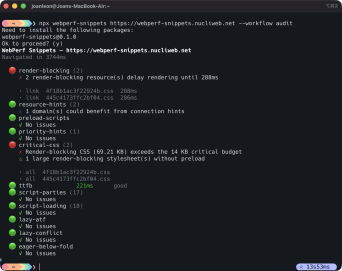
Run the structural audit workflow:
npx webperf-snippets https://example.com --workflow auditThe audit runs these checks on one page load. Only an issue of severity error makes the command exit with code 1; warnings and notes appear in the report without changing the exit code.
| Step | Checks |
|---|---|
render-blocking | Render-blocking CSS and scripts |
resource-hints | Preload, preconnect and dns-prefetch hints that nothing uses, and origins that need one |
preload-scripts | Scripts that combine preload with async or defer |
priority-hints | fetchpriority on the images that matter |
critical-css | Critical CSS inlined in the head |
ttfb | Time to first byte split into its sub-parts |
script-parties | First-party and third-party scripts |
script-loading | Loading strategy of every script |
compression | Text resources sent without compression |
inline-scripts | Size and parser blocking of inline scripts |
inline-css | Size and weight of inline CSS |
webfonts | Web fonts that fail, never load or weigh too much |
content-visibility | Offscreen sections that could use content-visibility |
prefetch | Prefetch hints for files the page already uses, and their total size |
lazy-atf | Lazy-loaded images above the fold |
lazy-conflict | Images with both loading="lazy" and fetchpriority="high" |
eager-below-fold | Images below the fold that load eagerly |
video | Poster, preload, autoplay and dimensions of <video> elements |
dom-size | DOM node count and depth |
oversized-images | Images whose file has many more pixels than the page shows |
image-audit | The LCP image, dimensions, loading and format of every <img> |
svg-bitmaps | SVG files that embed bitmaps |
The steps that make requests of their own run last, so those requests do not change what the earlier steps read.
Run the loading workflow, which measures timing on a real page load:
npx webperf-snippets https://example.com --workflow loadingIt runs these steps on one page load. As in the audit, only an issue of severity error makes the command exit with code 1.
| Step | Measures |
|---|---|
TTFB | Time to first byte, with a rating |
FCP | First Contentful Paint, with a rating |
render-blocking | Render-blocking CSS and scripts |
resource-hints | Preload, preconnect and dns-prefetch hints that nothing uses, and origins that need one |
scripts | Loading strategy and size of every script |
script-timings | DNS, connection, request and response time of first-party and third-party scripts |
ttfb-resources | Time to first byte of every resource, slowest first |
js-execution | Script execution time by script |
third-party-impact | Requests, size and main-thread time per third-party domain |
fonts | Preloaded fonts, and whether the page uses them above the fold |
cache-strategy | Cache headers of the resources, anti-patterns and uncompressed text |
The step that makes requests of its own (cache-strategy reads cache headers with HEAD requests) runs last, so those requests do not change what the earlier steps read.
The steps that tell first-party from third-party resources count as first party the root domain of the page and its subdomains (cdn.example.com for example.com). A site that serves its own assets from another domain, such as its CDN, lists it with --own-domains, comma-separated or repeated:
npx webperf-snippets https://example.com --workflow loading --own-domains cdn.example.net,static.example.orgEach domain counts with its root domain, so cdn.example.net makes every host under example.net first party. The CLI writes the list in the OWN_DOMAINS constant of each snippet, the same one you edit at the top of the snippet in the console. An empty domain or one with spaces exits with code 2.
Run the interaction workflow, which measures what happens while the page is used:
npx webperf-snippets https://example.com --workflow interaction
npx webperf-snippets https://example.com --workflow interaction --interact-script interactions.json
It installs the Interaction snippets, runs the interactions, and then reads them. Without --interact-script it scrolls the page, because clicks and typing belong to each site; with the script it runs the steps of the file instead. As in the other workflows, only an issue of severity error makes the command exit with code 1.
| Step | Measures |
|---|---|
long-tasks | Main-thread tasks over 50 ms, with their blocking time |
long-frames | Long animation frames and the scripts behind them |
scroll | Scroll frame rate, non-passive listeners and CSS that affects scrolling |
layout-shifts | Layout shifts, split between loading and interaction |
forced-layout | Forced synchronous layouts |
INP | Interaction to Next Paint, the worst interaction with its phases |
interactions | Every interaction with its latency and rating |
input-latency | Input delay, processing time and presentation delay of each event type |
INP, interactions and input-latency need a click or a type step. When the interactions have none, they appear as skipped with the reason, and they do not count as errors. When the script has a click but the page records no interaction, they are reported as not measured and do not count as errors, unless a budget needs their metric, such as --budget-inp; it usually means the step did not reach an element that responds.
Simulate a mobile viewport (default) or switch to desktop:
npx webperf-snippets https://example.com --viewport mobile
npx webperf-snippets https://example.com --viewport desktop
Measure under the conditions of a slower device and network with --cpu and --network. Without them the CLI runs at the speed of the machine, which on a laptop or a CI runner is faster than most phones:
npx webperf-snippets https://example.com --cpu 4 --network slow-4g--cpu <factor> slows the main thread down by that factor. --network takes the presets of DevTools, with the same values:
| Preset | Download | Upload | Latency |
|---|---|---|---|
fast-4g | 8.1 Mbps | 1.35 Mbps | 165 ms |
slow-4g | 1.44 Mbps | 675 kbps | 562.5 ms |
3g | 400 kbps | 400 kbps | 2000 ms |
Chrome adds the latency to the body of each response, not to its headers. The values read from responseStart, such as the TTFB and its sub-parts, do not include it; the download of each resource, FCP, LCP and the load event do. The report names the conditions under its header, and the JSON output carries them in throttling, such as { "cpu": 4, "network": "slow-4g" }. A CPU factor below 1 or an unknown preset exits with code 2.
One page load is one sample, and lab values vary from one load to the next. --runs <n> measures the page n times, from 1 to 9, one after the other, and reports the median run, as WebPageTest does: every result comes from that run, so they agree with each other (the sub-parts of the LCP add up to its LCP):
npx webperf-snippets https://example.com --runs 5 --budget-lcp 2500The median run is the one with the median LCP. A workflow without LCP uses the first of FCP, TTFB and the navigation time that it measures, and --median-by <metric> picks another one (LCP, FCP, TTFB, CLS, INP or navMs). With an even count it takes the lower of the two middle runs, so the report is always a run that happened. The report adds the median, min and max of each metric across the runs, and the JSON output carries them in runs:
"runs": {
  "count": 5,
  "failed": 0,
  "medianRun": 3,
  "medianBy": "LCP",
  "summary": {
    "LCP": { "median": 2140, "min": 1980, "max": 2610, "values": [2610, 2010, 2140, 1980, 2290], "unit": "ms" }
  }
}
medianRun counts from 1, and values keeps the order of the runs. The budgets compare the median of each metric, not one run. A run that fails, such as a navigation that does not finish, counts in failed and is left out of the median; when every run fails, the command exits with code 1. Each run is reported on stderr as it starts, so stdout keeps only the report. An invalid count or metric exits with code 2.
Measure several pages, on several devices and in several variants, in one command with --matrix <file>. The file lists them, and the CLI measures every URL on every device and in every variant, each combination runs times, one load after the other:
{
  "urls": {
    "home": "https://example.com/",
    "article": "https://example.com/news/some-article"
  },
  "devices": {
    "mobile": { "viewport": "mobile", "cpu": 4, "network": "slow-4g" },
    "high-end": { "viewport": "mobile", "cpu": 1, "network": { "downloadKbps": 50000, "uploadKbps": 10000, "latencyMs": 20 } },
    "desktop": { "viewport": "desktop" }
  },
  "variants": {
    "no-consent": {},
    "consent": { "storageState": "states/consent.json" }
  },
  "runs": 3
}
npx webperf-snippets --matrix matrix.json --budget-lcp 2500urls: names and URLs. An array of URLs also works, and names each one by its path and query (/,/news/), with the host when the URLs have more than one.devices: theviewportpreset, thecpufactor and thenetwork, a preset (fast-4g,slow-4g,3g) or a network of its own in kilobits per second and milliseconds, for the ones DevTools has no preset for, such as 5G. An array of viewport presets (["mobile", "desktop"]) is a shortcut for devices without throttling. Withoutdevices, the matrix measures a mid-range phone, with CPU 4x and Slow 4G, as Lighthouse does.variants: the conditions of each variant,storageState(relative to the file),headersandownDomains. Withoutvariants, the combinations are the pages on the devices: the report has no Variant column, and theidof a combination is its page and device (/news/ · mobile).runs(1 to 9) andmedianBy, which--runsand--median-byreplace.
The options of the command line apply to every combination: --workflow, --snippet, --wait, --interact-script, --header, --own-domains, --storage-state, --cpu, --network and the budgets. The file replaces cpu, network and storageState where it sets them, and its headers and ownDomains add to the ones of the command line, the variant winning on the same header. A matrix file is meant to be versioned, so pass secrets, such as the token of an access proxy, with --header and an environment variable; a header of the file whose name looks like a secret raises a warning. A key the CLI does not know is an error, so a typo does not measure without its condition.
The report is a table with one row per combination and the rated median of each metric, followed by the errors that decide the exit code; --verbose adds the report of the median run of each combination. --markdown gives the same table and folds the report of each combination into a <details> block, to keep a pull request comment readable. With --json, it is { "matrix", "runs", "combinations" }, each combination being the report of its median run with its id, name, device, variant (when the file defines variants), runs and conditions, with the viewport of its device. The budgets compare the median of each combination. The command exits with code 1 when a combination exceeds a budget, has an error or fails every run, and with code 2 for an invalid file, before any page load, naming the place of the problem in the JSON. --viewport does not apply, since each device sets its own.
With CrUX, the CLI asks once for each URL and form factor, so the variants of a device share their field data. With --report-to, it posts one report for each combination, the body of one page with meta.device, meta.variant and meta.runs; the headers of the command line and of the file are conditions of the load, and no report carries their values.
Compare a run with an earlier one with --baseline <file>, the --json output of that run. The comparison says which metrics got worse or better beyond the noise of the lab, which errors are new or fixed, and what differs in how both runs were measured:
# On main, once: the baseline
npx webperf-snippets https://example.com --runs 5 --json > baseline.json

# On the pull request: compare and report
npx webperf-snippets https://pr-123.example.com --runs 5 --baseline baseline.json --markdown

# Fail when the page gets worse
npx webperf-snippets https://pr-123.example.com --runs 5 --baseline baseline.json --fail-on-regression
LCP, FCP, TTFB, CLS and INP compare when both runs measured them, the median of each with --runs; a metric that only one side measured is not measured. A metric regresses when it gets worse by more than its threshold, the larger of a share of the baseline and a minimum, and, when the baseline has two runs or more, ends above the slowest of them: a median inside the range of the baseline is noise the baseline already had. It improves under the same rules the other way, and otherwise it is unchanged.
| Metric | Share of the baseline | Minimum |
|---|---|---|
| LCP, FCP, TTFB | 10% | 100 ms |
| INP | 10% | 50 ms |
| CLS | none | 0.05 |
--threshold changes one part of a threshold and keeps the other: --threshold LCP=15% the share, --threshold LCP=200ms the minimum, and --threshold CLS=0.1 the only part of CLS. Repeat it for more metrics.
The errors that compare are the ones that decide the exit code: the issues of severity error of the steps of the workflow and the snippets that failed. Two errors are the same when they share their code (opens in a new tab) and the resource they name, whatever their messages say; a resource of the page itself compares by its path and query, so the review app of a pull request, on another host, matches production. A snippet without codes on one side, as in a baseline of an earlier version, compares by message with the figures left out, so “Render-blocking CSS (69.21 KB)…” and “Render-blocking CSS (71.80 KB)…” are one error. An error that only this run has is new, and one that only the baseline had is fixed. Warnings and information do not compare, since they change too easily.
The report adds the comparison after the usual one, and --markdown a table for the pull request comment. The JSON output carries it in baseline:
"baseline": {
  "file": "baseline.json",
  "url": "https://example.com/",
  "runs": { "count": 5, "medianBy": "LCP" },
  "metrics": {
    "LCP": { "baseline": 2100, "current": 2480, "delta": 380, "deltaPercent": 18.1, "threshold": 210, "verdict": "regressed" }
  },
  "errors": { "new": [{ "id": "render-blocking", "message": "1 render-blocking resource(s) delay rendering until 900ms" }], "fixed": [] },
  "warnings": []
}
When both runs were measured differently, with another workflow or snippet, viewport, wait, throttling, number of runs or version of the CLI, or on another path or query, the CLI compares anyway and warns on stderr, in the reports and in warnings: whoever reads the pull request comment does not see the stderr of the CI. Another host does not warn, since it is the review app of a pull request against production. A baseline of one run warns that only the thresholds apply.
The comparison only informs, and the exit code is the same as without it, unless --fail-on-regression, which exits with 1 when a metric regressed or an error is new, and names them on stderr. A baseline that does not exist or is not an output of the CLI, a baseline of a page for a matrix or of a matrix for a page, or a --threshold the CLI does not understand exits with code 2, before the page loads.
A matrix compares with the --json output of an earlier matrix, each combination with the one of the same id:
npx webperf-snippets --matrix matrix.json --runs 3 --baseline last-week.jsonThe table adds a change column after each metric: the change when it counts (▲ +380ms, ▼ −90ms), = when it is unchanged, and new for a combination the baseline did not have. Below the table come the warnings, once when every combination has them, the new and fixed errors of each combination, and the combinations that only one side has. --markdown gives the same, and the <details> block of each combination carries its own comparison. In the JSON output each combination carries its baseline, and the root baseline names the file and the added and missing combinations. --fail-on-regression exits with 1 when any combination regressed or has a new error.
Show all items, including passing checks:
npx webperf-snippets https://example.com --verboseOptions
| Option | Description |
|---|---|
--workflow <name> | Workflow to run. Default: core-web-vitals. Options: core-web-vitals, loading, audit, interaction. |
--snippet <name> | Run a single snippet by name, alias or Category/Name path. |
--json | Output JSON instead of formatted text. |
--viewport <preset> | Viewport preset. Default: mobile. Options: mobile, tablet, desktop. |
--wait <ms> | Post-load wait before evaluating snippets. Default: 3000. |
--cpu <factor> | Slow the main thread down by this factor, such as 4. No throttling by default. |
--network <preset> | Throttle the network with a preset of DevTools: fast-4g, slow-4g, 3g. No throttling by default. |
--interact-script <path> | JSON file with the interactions to run after the page loads: scroll, click, hover, type and wait. |
--storage-state <path> | Playwright storage state (cookies and localStorage) for pages that require authentication. |
--header "Name: value" | Request header for the origin of the URL only, such as the token of an access proxy. Repeat it for more headers. |
--own-domains <list> | Domains of the site to count as first party, such as its own CDN. Comma-separated or repeated. |
--runs <n> | Measure the page n times, from 1 to 9, one after the other, and report the median run. |
--median-by <metric> | Metric that picks the median run: LCP, FCP, TTFB, CLS, INP or navMs. Default: the first of LCP, FCP, TTFB and navMs measured. |
--matrix <file> | Measure every URL of a JSON file on every device and in every variant it lists, and report a table of the medians. |
--baseline <file> | Compare the page, or each combination of a matrix, with the --json output of an earlier run: which metrics got worse or better beyond the noise, and which errors are new or fixed. |
--threshold <metric>=<v> | The threshold of a metric for --baseline, such as LCP=15%, LCP=200ms or CLS=0.1. Repeat it for more metrics. |
--fail-on-regression | Exit 1 when a metric regressed or an error is new against --baseline. |
--crux-key <key> | Add CrUX field data (p75) next to the measured values. Prefer CRUX_API_KEY. |
--report-to <url> | POST the results to this https URL after the run. No external calls without it. |
--api-key <key> | Sent as a Bearer token with --report-to. Prefer PERF_REVIEWS_API_KEY. |
--budget-lcp <ms> | Exit 1 if LCP exceeds this value or was not measured. |
--budget-fcp <ms> | Exit 1 if FCP exceeds this value or was not measured. |
--budget-ttfb <ms> | Exit 1 if TTFB exceeds this value or was not measured. |
--budget-cls <score> | Exit 1 if CLS exceeds this value or was not measured. |
--budget-inp <ms> | Exit 1 if INP exceeds this value or was not measured. |
--verbose | Show all items, including passing checks. |
--headed | Show the browser window (debug). |
-h, --help | Show help. |
Follow-up steps
The results of a run can add steps. They run on the same page load, appear after the steps of the workflow, and show the reason that added them. Each snippet runs once, and a snippet the workflow already ran is not repeated. The results of a follow-up do not add steps of their own.
| When | Adds |
|---|---|
| LCP over 2.5 s | LCP-Subparts |
| LCP over 4 s | LCP-Trail |
| The LCP element is an image | LCP-Image-Entropy and Image-Element-Audit |
| The LCP element is a video poster | LCP-Video-Candidate and Video-Element-Audit |
| CLS over 0.1 | Layout-Shift-Loading-and-Interaction |
| CLS over 0.25 | The lazy images above the fold, the fonts, the critical CSS and the images without dimensions |
| TTFB over 600 ms | TTFB-Sub-Parts |
| FCP over 1.8 s | Find-render-blocking-resources |
A follow-up informs: the error issues it reports appear in the report and do not change the exit code. Use the audit workflow, or --snippet with the snippet itself, to gate on them.
Exit codes
| Code | Meaning |
|---|---|
0 | All checks passed. |
1 | Budget violation, a snippet errored, a step of the workflow reported an error issue, or, with --fail-on-regression, a regression against the baseline. |
2 | Usage error (missing URL, unknown workflow, a baseline or threshold that is not valid). |
Run it from an AI agent
Each snippet page has a Copy prompt button above the code. The prompt asks an AI agent with a terminal to run that snippet with this CLI, pinned to the published version, and to report the result. It includes the install command, the --snippet name, an --interact-script when the snippet needs interactions, and how to read the status, issues and corsLimitedAnalysis fields. The agent asks for the URL if you do not give it one.
The snippets an agent cannot run in a meaningful way have no button: the Fetch & XHR Timeline overrides, which need DevTools Local Overrides, the Long Animation Frames helpers, and Network Bandwidth & Connection Quality, because headless Chromium reports the connection of the machine it runs on. The Back/forward cache prompt says that the result is partial, since the CLI does not navigate back.
An agent in an MCP client can also call the snippets as tools: webperf-snippets mcp starts the MCP server of the CLI.
CI integration
GitHub Actions example, fail the PR if LCP exceeds 2.5s:
- run: |
    npm install --no-save webperf-snippets playwright
    npx playwright install --with-deps chromium
    npx webperf-snippets https://staging.example.com --budget-lcp 2500 --budget-cls 0.1
GitHub Action
The repository ships a composite action that installs the CLI and Chromium, runs a workflow and exposes the result as markdown, so any repository can gate on performance budgets without extra setup:
jobs:
  webperf:
    runs-on: ubuntu-latest
    permissions:
      pull-requests: write
    steps:
      - uses: nucliweb/webperf-snippets/.github/actions/webperf-snippets@main
        id: webperf
        with:
          url: https://staging.example.com
          budget-lcp: 2500
          fail-on-budget: "false"

      - uses: actions/github-script@v7
        env:
          BODY: ${{ steps.webperf.outputs.markdown }}
        with:
          script: |
            await github.rest.issues.createComment({
              ...context.repo,
              issue_number: context.issue.number,
              body: process.env.BODY,
            });

      - if: steps.webperf.outputs.exit-code != '0'
run: exit 1| Input | Default | Description |
|---|---|---|
url | required | URL to measure. |
workflow | core-web-vitals | Workflow to run: core-web-vitals, loading, audit or interaction. |
budget-lcp | auto | LCP budget in ms. auto is 2500 with core-web-vitals and no budget with the other workflows. An empty value disables the check. |
budget-fcp | FCP budget in ms, for loading. | |
budget-ttfb | TTFB budget in ms, for loading or audit. | |
budget-cls | auto | CLS budget. auto is 0.1 with core-web-vitals and no budget with the other workflows. An empty value disables the check. |
budget-inp | INP budget in ms, for interaction with a click or a key press. | |
fail-on-budget | true | Fail the step when a budget is exceeded or a snippet errors. Use "false" to read exit-code and decide yourself. |
cli-version | latest | Version of the webperf-snippets npm package to run. |
| Output | Description |
|---|---|
markdown | The results as markdown. Also written to the job summary. |
exit-code | Exit code of the CLI: 0 passed, 1 budget exceeded or a snippet errored, 2 usage error. |
The markdown includes text taken from the measured page, so pass it to other steps through an environment variable (env: and process.env) as above, never by interpolating ${{ steps.webperf.outputs.markdown }} inside a script. With fail-on-budget: "false" the action step always succeeds, which lets later steps post the comment before the job fails. Without permissions: pull-requests: write the comment step cannot post on a pull request.
LCP, CLS and INP vary by 15 to 30% on shared runners; prefer the deterministic audit workflow for a gate, or generous budgets.
How it works
- Launches headless Chromium via Playwright.
- Pre-registers
PerformanceObservers for LCP and layout-shift before navigation. - Navigates and waits for the page to settle.
- Evaluates each snippet’s IIFE in the page context, capturing the returned object.
- Applies the workflow’s decision tree to enqueue follow-up snippets.
- Renders results (human-readable or JSON) and exits with the appropriate code.
Known limitations
- Synthetic INP ≠ field INP:
--interact-scriptmeasures the latency of the steps it scripts. Real INP reflects the worst interaction across real sessions; use RUM for field data. - CLS in headless is conservative: layout shifts that only happen on scroll are missed unless you script the scroll.
- First navigation only: each invocation runs one URL. SPAs need the post-route URL passed directly.
- Follow-ups see the page as it is: they run after the steps of the workflow on the same page load, so they read what is there when they run, not a fresh load.
Further reading
- GitHub Repository (opens in a new tab), source code and issue tracker
- npm package (opens in a new tab), changelog and releases